
Weekly Spending Limit
One of the problems with traditional budgeting is it’s hard to know what number to concentrate on. One approach is to give everything dollar a job and track all the money you are spending by categories. But this makes the process cumbersome. “Is that Amazon purchase household or groceries?”, for example. Half way through a month, it can be hard to know if you have over-spent in one category and under-spent in another, and if that is the case what does that mean. The process can be so cumbersome people give up. There’s got to be a better way.
When I was attempting to re-imagine the process I thought about what would be ideal. The better solution I thought would be to have one number to concentrate on that as long as you didn’t spend over this amount you would be OK. This number would take into already take into account all of your regular income and committed expenses so you could be assured that as long as you spent less than this number, you would be in good financial health. This would eliminate the confusion of categories and make budgets easier to understand and stick to.
This is the idea behind the weekly spending limit.
Here’s how the idea works, each week at the beginning of the week, you add your weekly spending limit to a set of money called your “Safe-to-Spend”. Then you monitor your Safe-to-Spend to purchase the things you need in your day-to-day life. When your “Safe-to-Spend” is empty (or nearly empty) then its is time to slow down and stop spending.
But how much money should you be allowed to spend every week? What should your Weekly Spending Limit be?
Let me explain how we figure out this number.
First, to simply the process of budgeting, we break down spending into two types — Recurring and Day-to-Day.
For example, let’s say you make $5,000 a month but $3,500 of that is already spoken for by way of a mortgage, car payment, insurance, and other recurring expenses. That leaves you with $1,500 per month ($346.16 per week) to spend on day-to-day expenses like groceries and clothes.
Understanding the difference between recurring and day-to-day expenses is the first step to using Weekly. Let’s walk through some examples to make the differences clear.
Recurring Items
Two tell-tale signs of a recurring expenses are that they happen at regular intervals and are generally for the same amount. Also, these items can usually be set up to process automatically and include things like your paycheck, mortgage/rent, car payment, and insurance. You’ll input these items when you sign up for Weekly, but you can always edit them later if they change. Once you’ve input your recurring items, Weekly will provide you with your weekly Allowance that can be used for day-to-day expenses.
Paycheck (Income)
Assuming you have a consistent paycheck, you can set the amount and frequency of your paycheck in the app to determine your weekly income. Having an average weekly amount of income helps avoid overspending on payday.
If your primary income source varies, we recommend you enter a conservative average income based on your past 6–12 months. While you could enter your variable paychecks as day-to-day income, using a general estimate to enter your regular income as recurring will help you get the best value out of Weekly’s budgeting system.
Loan Payments
Loan payments are the simplest form of recurring expenses. They occur at regular intervals for a consistent, predetermined amount. Weekly will prompt you to add recurring expenses for different types of loans including mortgages, auto loans, student loans, and personal loans. You can always add your own custom loan descriptions as well.
Utility Bills
Utility Bills are considered a recurring expenses. If you are paying a different amount each month based on usage, we recommend enrolling in an equal payment plan if it’s offered by your provider and using that number. You can also take a look at your past 12 months of bills to get an average amount and enter that amount in Weekly.
Savings Goals
Savings goals are a critical part of a successful budget. You want to save for emergencies, vacations or big life events to make sure the money is available when you need it!
Within Weekly, a savings goal operates the same as a recurring expense. The purpose of the savings goal is make sure you are not spending money you need for another purpose in the future. Like other recurring expenses, savings goals lower your weekly Allowance so that you have money saved for each of your targets.
These recurring items are all entered.
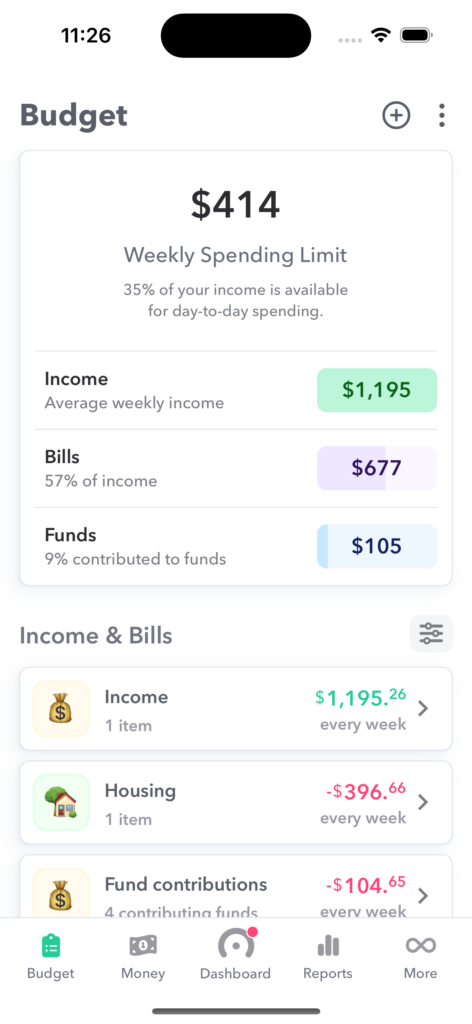
Day-to-Day Items
Day-to-day expenses are one-time purchases that are generally paid for with cash or card. These expenses are not included in your recurring items and are recorded on the Tracker Page.
Let’s go through some common examples.
Food
Although groceries and dining out are expenses that happen regularly, (gotta eat, right?) because the amount you spend and the frequency of food purchases vary, these expenses are considered day-to-day expenses. For example, the amount you spend on groceries varies greatly based on the food choices you make each week. Note: One exception to this rule are subscription services like Blue Apron. Because this is a regular expense that is automatically withdrawn from your account, it’s a recurring expense.
Household
Those trips to Target or purchases from Amazon are considered day-to-day transactions that should be entered in the tracker.
Gas
Gas fill-ups are considered a day-to-day expenses. This is because using a car is voluntary for some people who could use a bike, the bus or the subway to get to work. Also, gas expenses can vary based on extra-curricular travel. But, if you feel you need to budget some amount for gas as a recurring expenses so you don’t accidentally spend your Allowance and have nothing set aside to fill up the tank and go to work, then it’s okay to estimate the amount will spend on gas and enter it as a recurring expense.
Irregular Income
Day-to-day items can also include irregular income like bonuses, birthday money from Grandma, or income from a side job. If this income is not included as a recurring item then you get to decide how to use it. You may decide to pay off debt, put that money into savings, or simply spend it. If you’d like to spend the money, simply add the amount you’d like to spend as an income transaction within Weekly. This will increase your Safe-to-Spend amount.
Your Weekly Spending Limit
Your Weekly Spending Limit is calculated from figuring out what is left over after you subtract your recurring expenses from your recurring income. Your Weekly Spending Limit is added to your Safe-to-Spend amount at the beginning of your week, and your day-to-day expenses are taken out of it when you enter them manually or by download them from your bank or credit card inside the Tracker. By breaking down finances into weekly chunks, Weekly makes spending easier to manage. By staying focused only on spending less than your Safe-to-Spend, you’ll be able to spend confidently knowing everything has been factored into that number.
How is my weekly spending limit calculated?
Your Weekly Spending Limit is at the heart of Weekly’s budgeting system. This number is an average amount that you can safely spend each week and still have enough money for bills and savings goals. To find your Weekly Spending Limit you simply subtract your average weekly bills and savings goals from your average weekly income.
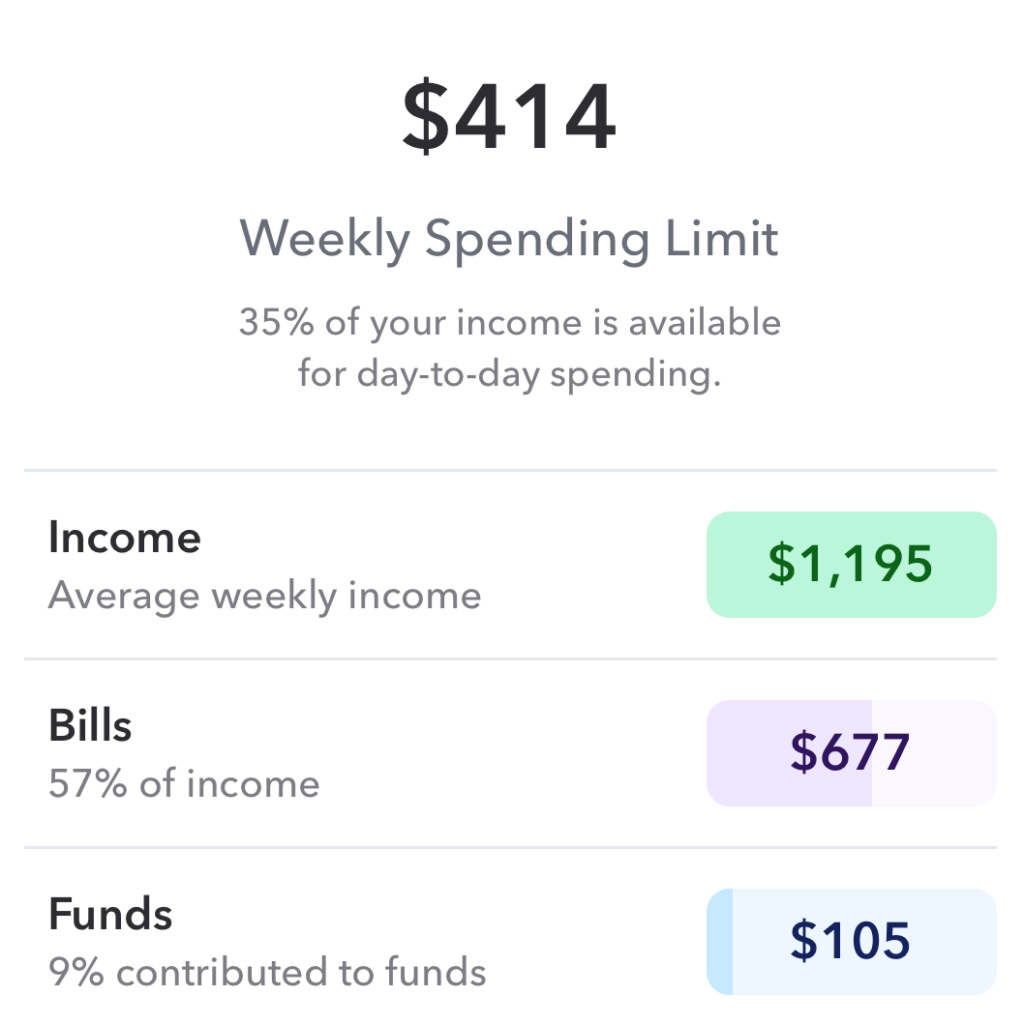
To calculate this number we first have to find the average weekly amount for both your regular income and your recurring expenses. Weekly takes the amount of each item and converts it to a weekly amount. For example, if you’re paid every two weeks, Weekly simply takes that income and divides it by two to get your weekly income.
Many bills, subscriptions, and loan payments are paid on a monthly basis. To convert a monthly amount to a weekly amount we divide by the average number of weeks per month which is 4.34524.
You can use this chart to convert any recurring transaction to a weekly amount.
| Weekly | Divide by 1 |
| Every two weeks | Divide by 2 |
| Twice a month | Multiply by 2 then divide by 4.34524 |
| Monthly | Divide by 4.34524 |
| Every x Months | Divide by x then divide by 4.34524 |
Weekly Amount Conversion Chart
After converting each bill or income item to a weekly amount, Weekly then subtracts the total income from total expenses. Voila! This is your weekly spending limit.
Weekly Spending Limit = Total weekly equivalent income – Total weekly equivalent committed expenses
Example Weekly Spending Limit Calculation
Let’s walk through a quick example budget so we can exemplify how the Weekly Spending Limit is calculated.
To keep it simple, we will have only three budget items.
| Budget Item | Amount and Frequency |
| Salary | $2,000 twice a month |
| Rent | $1,000 a month |
| Car Payment | $375 a month |
Ok let’s start with income. You have a twice a month (bi-monthly) salary check of $2,000. First we find out how much that is per week.
$2,000 x 2 / 4.34524 = $920.54
So you are making the equivalent of $920.54 per week.
If you had more than one income, you would do the same type of calculation and then add them together to get your aggregated weekly equivalent income.
Now let’s tackle those two expenses (don’t I wish I had only two!) — they are $1,000 a month for rent and a $375 car payment.
Rent
$1,000 / 4.34524= $230.14
So you are spending the equivalent of $230.14 per week for rent.
Car Payment
$375 / 4.34524 = $86.30
So you are spending the equivalent of $86.39 per week for your car payment.
The next step is to add up all your weekly equivalent expenses to get a total weekly equivalent amount.
$230.14 + $86.30 = $316.44
To find your Weekly Spending Limit, you would simply the sum of all your weekly equivalent expenses from your weekly equivalent income.
$920.51 – $316.44 = $604.07
So the Weekly Spending Limit would be $604.07. This amount would be added to the Safe-to-Spend each week.
Viewing All Amounts In Weeks
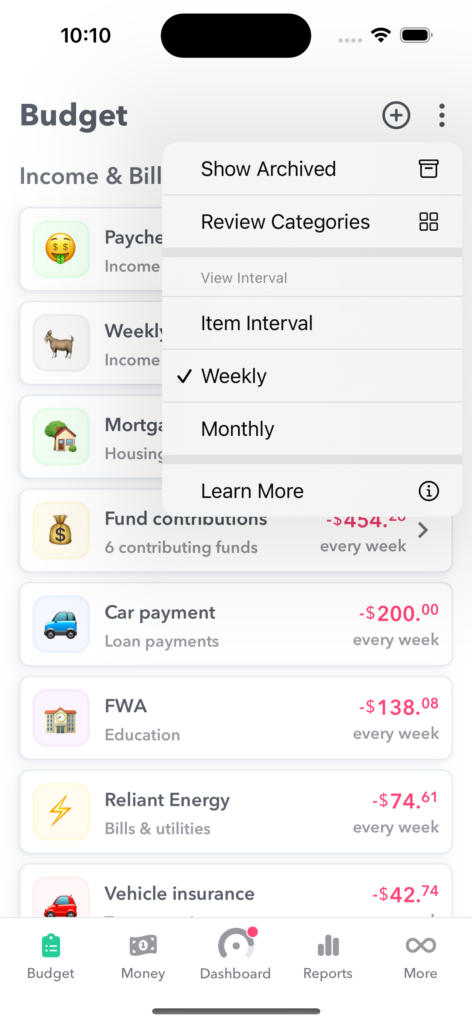
You can see all the weekly averages of all your income and expenses. Just tap the three dots on the top right corner of the Budget tab and select “Weekly” under “View interval”. Now all the recurring income and expenses are shown in weeks. Pretty cool!
Learn more about why Weekly uses averages.
What if my Weekly Spending Limit seems wrong?
You might just be started with Weekly and entered all your budget items into the app but your Weekly Spending Limit seems wrong. Perhaps you think it looks too large (“There’s no way I can spend that much each week and hit all my goals?!”) or too small or even negative (“So, I can spend negative dollars this week? What’s going on?”).
Things to Check if your Weekly Spending Limit seems inaccurate.
Here are the things to check to make sure your Weekly Spending Limit is accurate.
Check your last 30 days of transaction in your credit card and bank account
Login to your online banking and peruse your last 30 days credit card and checking transactions for anything that it a regular expense that you might have missed.
Think about bills you might pay quarterly or yearly and make sure to add those
Don’t forget to think about bills that happens at non-monthly intervals. For example, pool dues or insurance might be paid quarterly or yearly. Weekly supports many different intervals so whatever whenever your bill reoccurs we should have you covered.
Check your pay interval
Check your paycheck interval to make sure it is accurate. Remember bi-weekly is different than twice a month.
Here’s how to add any recurring expenses you missed
If you find recurring bills you missed, you can add it into Weekly at any time in one of three ways.
- Re-launch the setup process – You can relaunch the onboarding process to add in new items. Simply tap the menu on the top left, go to “Settings” then select the “Review budget items”. This will launch the same on-boarding flow you filled out when you first downloaded Weekly but with all the items you have already entered intact.
- Add budget item from the “Budget” screen – You can tap the menu on the top left, selecting “Budget”, then hitting the (+) icon.
- Add the budget items “on the fly” when you add a transaction – When you add a new expense transaction, either manually or from a bank download, you have the option to “Create a new item” when assigning it to a recurring expense. If you choose this option, it will be added into your budget and your current and future Safe-to-Spend amounts will be adjusted (it will not adjust the past Safe-t0-Spend amounts).
Now that you have checked everything, do things seems still off?
“I have done all of these things but my Weekly Spending Limit is way too low / negative?”
There are two situation that can make this occur:
You live off of irregular or lumpy income.
If your Weekly Spending Limit is too low or negative you may be dealing with “lumpy” income and using that to pay off your regular expenses. This is not necessarily a bad thing and there are a couple ways to handle this situation. You can …
- Deal with the negative amount until your lumpy income comes in and then add that to your Safe-to-Spend each time. You can also rollover any positive end of week balances to the next week.
- Estimate what you confidently think is a floor for your irregular income and add that as recurring income budget item. When the real amount of income comes in you can
- Update the recurring income item to be the current amount of the check. This will adjust your Safe-to-Spend in the current and future weeks.
- Don’t update the recurring item but then manually add an income transaction for the difference and add that to your Safe-to-Spend or a fund.
Your living situation is not sustainable
If your Weekly Spending Limit is too low or negative you may just not be in a sustainable financial situation. You need to reduce your regular expenses or increase your income or both.
“I have too much money to spend, this seems dangerous!”
Congrats! You are in a positive financial situation. Consider setting up a fund to save for retirement or other life goal. Once you decide how much you want to save, Weekly will take this out of your Weekly Spending Limit before it is added to your current Safe-to-Spend.
Happy budgeting!
Weekly is saying my Weekly Spending Limit is negative. What do I do?
If your Weekly Spending Limit is in the negative, there are two situation that can make this occur:
You live off of irregular or lumpy income.
If your Weekly Spending Limit is too low or negative you may be dealing with “lumpy” income and using that to pay off your regular expenses. This is not necessarily a bad thing and there are a couple ways to handle this situation. You can …
- Deal with the negative amount until your lumpy income comes in and then add that to your Safe-to-Spend each time. You can also rollover any positive end-of-week balances to the next week.
- Estimate what you confidently think is a floor for your irregular income and add that as recurring income budget item. When the real amount of income comes in you can
- Update the recurring income item to be the current amount of the check. This will adjust your Safe-to-Spend in the current and future weeks.
- Don’t update the recurring item but then manually add an income transaction for the difference and add that to your Safe-to-Spend or a fund.
See more details in our article about how to handle variable income.
Your living situation is not sustainable
If your Weekly Spending Limit is too low or negative you may just not be in a sustainable financial situation. You need to reduce your regular expenses or increase your income or both.